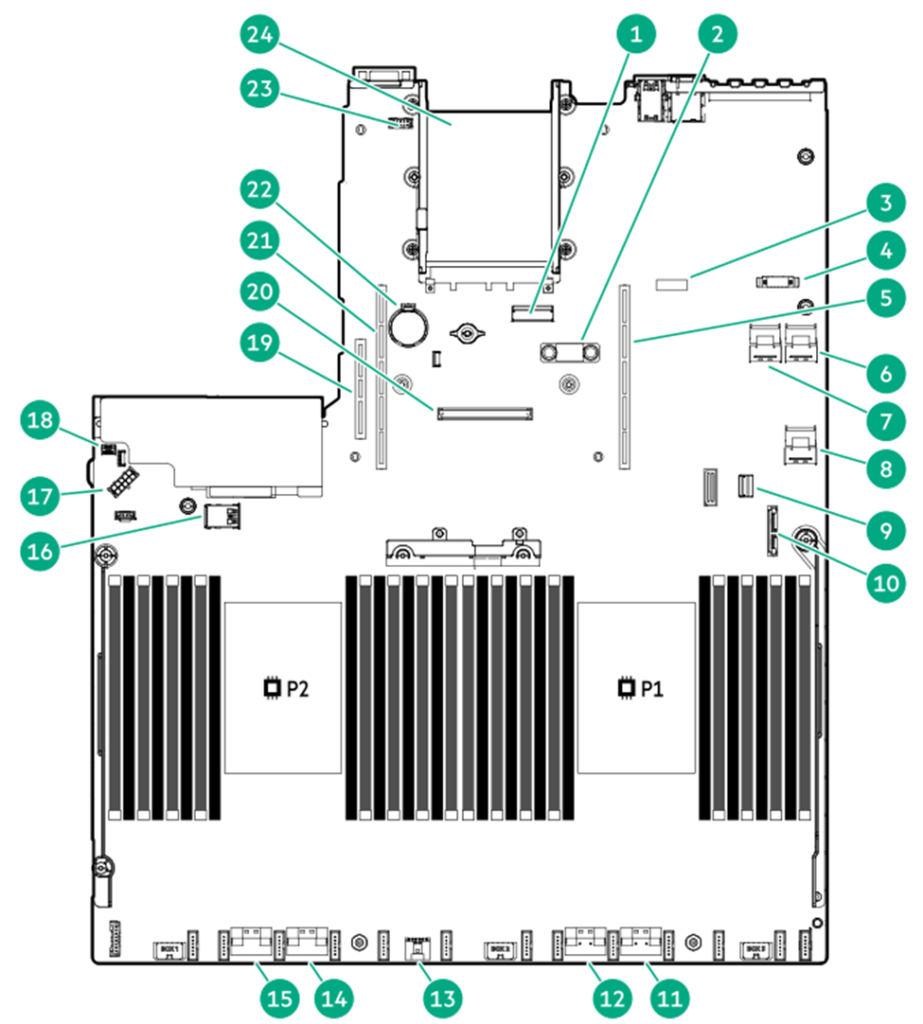
| شماره | توضیحات |
| 1 | x8 Slimline connector |
| 2 | TPM connector |
| 3 | System maintenance switch |
| 4 | Front display port/USB 2.0 connector |
| 5 | Primary (processor 1) PCIe riser connector |
| 6 | x4 SATA port 2 |
| 7 | x4 SATA port 1 |
| 8 | x4 SATA port 3 |
| 9 | Front power/USB 3.0 connector |
| 10 | SATA optical port 4 |
| 11 | x8 NVMe port 2A |
| 12 | x8 NVMe port 1A |
| 13 | Energy pack connector |
| 14 | x8 NVMe port 2B |
| 15 | x8 NVMe port 1B |
| 16 | Dual internal USB 3.0 connector |
| 17 | Drive backplane power connector |
| 18 | Chassis Intrusion Detection connector |
| 19 | Tertiary (processor 2) PCIe riser connector |
| 20 | Type-a storage controller slot |
| 21 | Secondary (processor 2) PCIe riser connector |
| 22 | System battery |
| 23 | Serial port connector |
| 24 | OCP 3.0 adapter bay |
اجزای هیت سینک و سوکت پردازنده سرور HPE DL380 Gen10 Plus
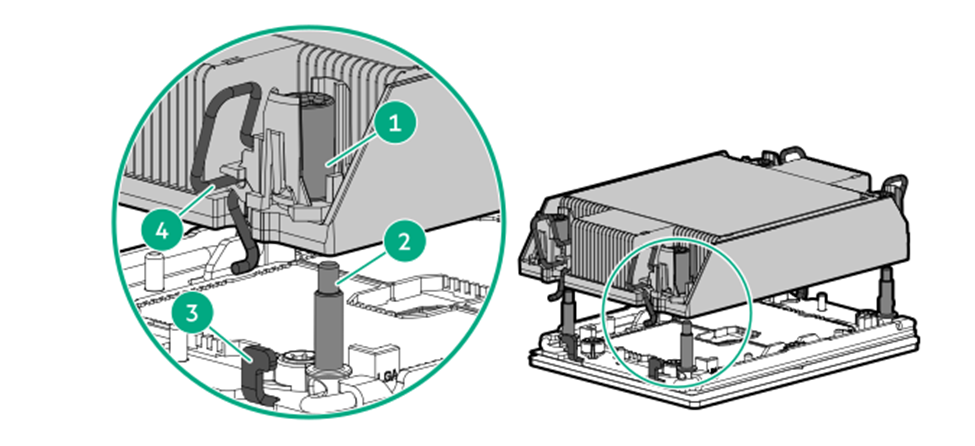
| شماره | توضیحات |
| 1 | Heatsink nuts |
| 2 | Alignment screws |
| 3 | Latch tabs |
| 4 | Heatsink latches |
تشخیص لیبل رم DIMM سرور HPE DL380 Gen10 Plus
برای تعیین مشخصات DIMM، به برچسب متصل به DIMM مراجعه کنید. اطلاعات این بخش به شما کمک می کند تا از برچسب برای پیدا کردن اطلاعات خاص در مورد DIMM استفاده کنید.
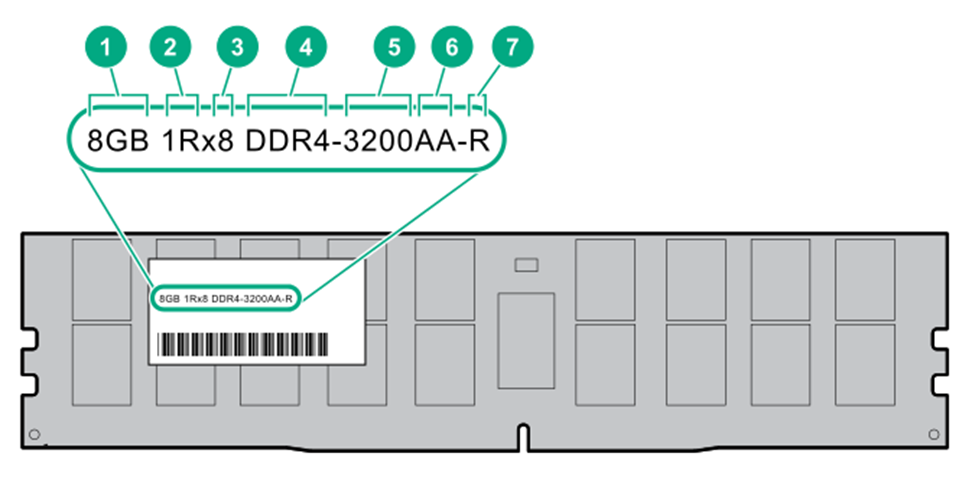
| Item | Description | Example |
| 1 | Capacity | 8GB 16GB 32GB 64GB 128GB 256GB |
| 2 | Rank | 1R = Single rank 2R = Dual rank 4R = Quad rank 8R = Octal rank |
| 3 | Data width on DRAM | x4 = 4-bit x8 = 8-bit |
| 4 | Memory generation | PC4 = DDR4 |
| 5 | Maximum memory speed | 3200MT/s |
| 6 | CAS latency | AA = CAS 22-22-22 AA = CAS 26-22-22 (for 3DS LRDIMM) |
| 7 | DIMM type | R = RDIMM (registered) L = LRDIMM (load reduced) |
برای اطلاعات بیشتر درباره ویژگیهای محصول، مشخصات، گزینهها، پیکربندیها و سازگاری، به HPE DDR4 SmartMemory QuickSpecs در وبسایت شرکت HPE مراجعه کنید.
تشخیص لیبل Intel Optane persistent memory 200 series
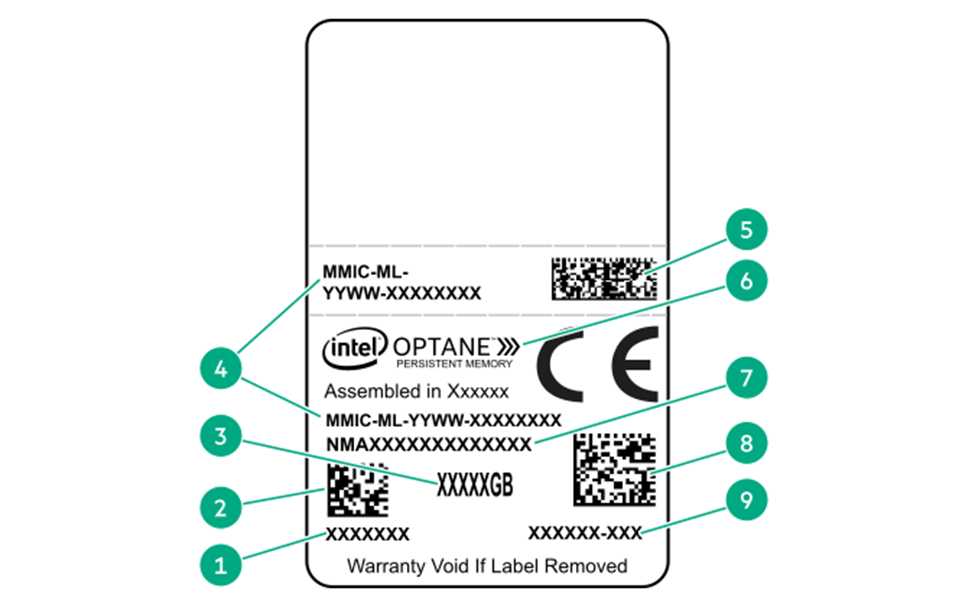
| شماره | توضیحات | مثال |
| 1 | Work Order Number | XXXXXXX |
| 2 | Work Order Number Barcode | XXXXXXX |
| 3 | Capacity | 128 GB 256 GB 512 GB |
| 4 | Unique ID number | 8089-A2-1802-1234567A |
| 5 | Serial Number and Part Number Barcode | S8089A218040000168APNMAXXXXXXXXXXX |
| 6 | Product Name | Intel® Optane™ persistent memory |
| 7 | Part Number | 1234567A |
| 8 | Serial Number Barcode | 8089-A2-1802-1234567A |
| 9 | PBA Number | XXXXXX-XXX |
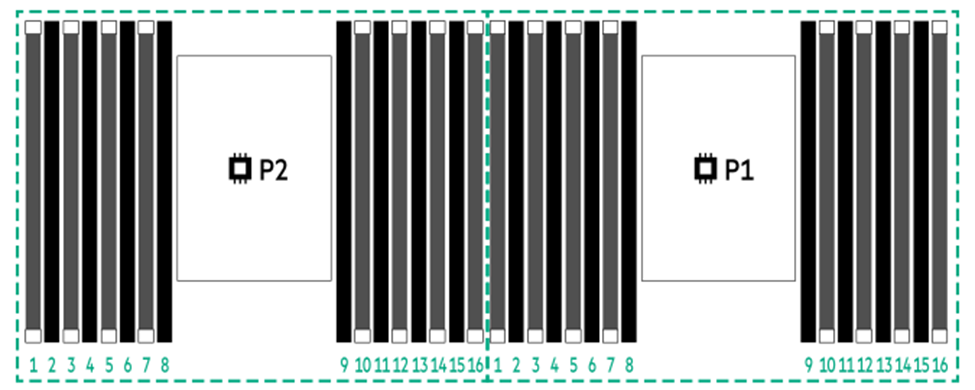
محل قرار گیری اسلات DIMM سرور HPE DL380 Gen10 Plus
اسلات های رم به ترتیب شماره گذاری شده اند : از شماره 1 تا 16 برای هر پردازنده
توضیحات کلیدSystem maintenance switch سرور HPE DL380 Gen10 Plus
1To access the redundant ROM, set S1, S5, and S6 to On.
2When the system maintenance switch position 6 is set to the On position, the system is prepared to restore all configuration settings to their manufacturing defaults.
3When the system maintenance switch position 6 is set to the On position and Secure Boot is enabled, some configurations cannot be restored. For more information, see Secure Boot.